
Linux版主机宝安装Carbon Forum,启用rewrite规则教程
By
lincanbin
at 2015-05-20 • 2人收藏 • 3154人看过

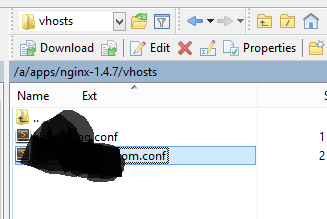
进入
主机宝安装目录/apps/nginx/vhosts
找到对应网站的配置文件.conf,编辑
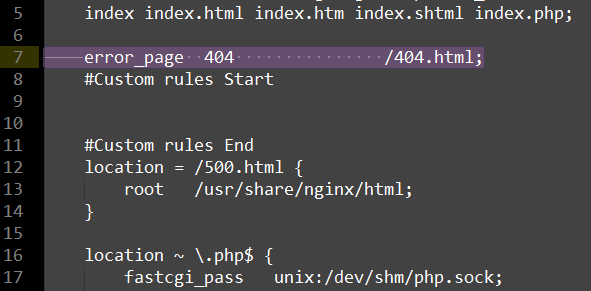
找到
error_page 404 /404.html;
将其替换为Carbon Forum根目录下nginx.conf里的内容,修改后如图所示:
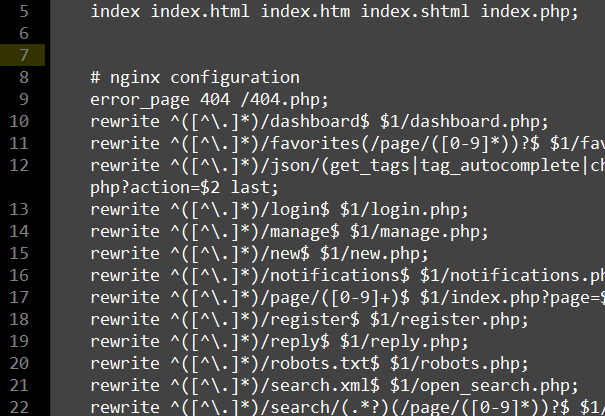
SSH登陆,执行
service nginx restart
重启nginx,完成。
7 个回复 | 最后更新于 2016-07-13

回复#1 @rampage :
https://github.com/lincanbin/Carbon-Forum/blob/master/nginx.conf
适合自己版本的Nginx规则一直都在程序目录下的nginx.conf里。
感想@rampage 的反馈:
#carbon forum 5.6.1 nginx configuration rewrite 重定向配置
if (!-e $request_filename){
rewrite ^/(.*)/dashboard /$1/dashboard.php last;
rewrite ^/(.*)/forgot /$1/forgot.php last;
rewrite ^/(.*)/favorites(/page/([0-9]*))? /$1/favorites.php\?page=$3 last;
rewrite ^/(.*)/goto/([0-9]+)-([0-9]+) /$1/goto.php\?topic_id=$2&post_id=$3 last;
rewrite ^/(.*)/json/([0-9a-z_\-]+) /$1/json.php\?action=$2 last;
rewrite ^/(.*)/login(.*) /$1/login.php$2 last;
rewrite ^/(.*)/manage /$1/manage.php last;
rewrite ^/(.*)/new /$1/new.php last;
rewrite ^/(.*)/notifications /$1/notifications.php last;
rewrite ^/(.*)/oauth-([0-9]+) /$1/oauth.php\?app_id=$2 last;
rewrite ^/(.*)/page/([0-9]+) /$1/index.php\?page=$2 last;
rewrite ^/(.*)/register(.*) /$1/register.php$2 last;
rewrite ^/(.*)/reply /$1/reply.php last;
rewrite ^/(.*)/reset_password/(.*) /$1/reset_password.php\?access_token=$2 last;
rewrite ^/(.*)/robots.txt /$1/robots.php last;
rewrite ^/(.*)/search.xml /$1/open_search.php last;
rewrite ^/(.*)/search/([^/]*)(/page/([0-9]*))? /$1/search.php\?keyword=$2&page=$4 last;
rewrite ^/(.*)/settings /$1/settings.php last;
rewrite ^/(.*)/sitemap-(topics|pages|tags|users|index)(-([0-9]+))?.xml /$1/sitemap.php\?action=$2&page=$4 last;
rewrite ^/(.*)/statistics /$1/statistics.php last;
rewrite ^/(.*)/t/([0-9]+)(-([0-9]*))?(.*) /$1/topic.php\?id=$2&page=$4 last;
rewrite ^/(.*)/tag/([^/]*)(/page/([0-9]*))? /$1/tag.php\?name=$2&page=$4 last;
rewrite ^/(.*)/tags/following(/page/([0-9]*))? /$1/favorite_tags.php\?page=$3 last;
rewrite ^/(.*)/tags(/page/([0-9]*))? /$1/tags.php\?page=$3 last;
rewrite ^/(.*)/u/(.*) /$1/user.php\?username=$2 last;
rewrite ^/(.*)/users/following(/page/([0-9]*))? /$1/favorite_users.php\?page=$3 last;
rewrite ^/(.*)/upload_controller(.*) /$1/upload_controller.php$2 last;
rewrite ^/(.*)/view-(desktop|mobile)\?(.*) /$1/view.php\?view=$2&$3 last;
}

前面贴的代码有问题,测试通过的
##
# You should look at the following URL's in order to grasp a solid understanding
# of Nginx configuration files in order to fully unleash the power of Nginx.
# http://wiki.nginx.org/Pitfalls
# http://wiki.nginx.org/QuickStart
# http://wiki.nginx.org/Configuration
#
# Generally, you will want to move this file somewhere, and start with a clean
# file but keep this around for reference. Or just disable in sites-enabled.
#
# Please see /usr/share/doc/nginx-doc/examples/ for more detailed examples.
##

# Default server configuration
#

server {
  # don't forget to tell on which port this server listens
  listen 80;
  listen [::]:80;

  # listen on the www host
 server_name *.example.com;

  # and redirect to the non-www host (declared below)
  return 301 https://example.com$request_uri;
}

server{
# listen 443 ssl default_server;
# listen [::]:443 ssl default_server;
listen 443 ssl http2;
listen [::]:443 ssl http2;

ssl on;
ssl_certificate /etc/letsencrypt/live/example.com/fullchain.pem;
ssl_certificate_key /etc/letsencrypt/live/example.com/privkey.pem;
include h5bp/directive-only/ssl-stapling.conf;


    root /var/www/cf-pokemongo;

	#Add index.php to the list if you are using PHP
    #index.htm is used for folder mask
	index index.html index.htm index.php;

	#Specify a charset
    charset utf-8;

	server_name example.com;

	access_log /var/log/nginx/example.com.access_log;
	error_log /var/log/nginx/example.com.error_log info;

    include h5bp/directive-only/cache-file-descriptors.conf;
    include h5bp/basic.conf;
    #basic.conf including the following 4
    #x-ua-compatible;
    #expires;
    #cross-domain-fonts; #"Access-Control-Allow-Origin" "*";
    #protect-system-files;

    #include h5bp/directive-only/extra-security.conf;
    #this tells nginx to cache open file handles
    #include h5bp/directive-only/no-transform.conf;

#Custom 404 page
error_page 404 /404.php;

#carbon forum 5.6.1 nginx configuration rewrite 重定向配置
if (!-e $request_filename){
rewrite ^/(.*)/dashboard /$1/dashboard.php last;
rewrite ^/(.*)/forgot /$1/forgot.php last;
rewrite ^/(.*)/favorites(/page/([0-9]*))? /$1/favorites.php\?page=$3 last;
rewrite ^/(.*)/goto/([0-9]+)-([0-9]+) /$1/goto.php\?topic_id=$2&post_id=$3 last;
rewrite ^/(.*)/json/([0-9a-z_\-]+) /$1/json.php\?action=$2 last;
rewrite ^/(.*)/login(.*) /$1/login.php$2 last;
rewrite ^/(.*)/manage /$1/manage.php last;
rewrite ^/(.*)/new /$1/new.php last;
rewrite ^/(.*)/notifications /$1/notifications.php last;
rewrite ^/(.*)/oauth-([0-9]+) /$1/oauth.php\?app_id=$2 last;
rewrite ^/(.*)/page/([0-9]+) /$1/index.php\?page=$2 last;
rewrite ^/(.*)/register(.*) /$1/register.php$2 last;
rewrite ^/(.*)/reply /$1/reply.php last;
rewrite ^/(.*)/reset_password/(.*) /$1/reset_password.php\?access_token=$2 last;
rewrite ^/(.*)/robots.txt /$1/robots.php last;
rewrite ^/(.*)/search.xml /$1/open_search.php last;
rewrite ^/(.*)/search/([^/]*)(/page/([0-9]*))? /$1/search.php\?keyword=$2&page=$4 last;
rewrite ^/(.*)/settings /$1/settings.php last;
rewrite ^/(.*)/sitemap-(topics|pages|tags|users|index)(-([0-9]+))?.xml /$1/sitemap.php\?action=$2&page=$4 last;
rewrite ^/(.*)/statistics /$1/statistics.php last;
rewrite ^/(.*)/t/([0-9]+)(-([0-9]*))?(.*) /$1/topic.php\?id=$2&page=$4 last;
rewrite ^/(.*)/tag/([^/]*)(/page/([0-9]*))? /$1/tag.php\?name=$2&page=$4 last;
rewrite ^/(.*)/tags/following(/page/([0-9]*))? /$1/favorite_tags.php\?page=$3 last;
rewrite ^/(.*)/tags(/page/([0-9]*))? /$1/tags.php\?page=$3 last;
rewrite ^/(.*)/u/(.*) /$1/user.php\?username=$2 last;
rewrite ^/(.*)/users/following(/page/([0-9]*))? /$1/favorite_users.php\?page=$3 last;
rewrite ^/(.*)/upload_controller(.*) /$1/upload_controller.php$2 last;
rewrite ^/(.*)/view-(desktop|mobile)\?(.*) /$1/view.php\?view=$2&$3 last;
}

location / {
        include    /etc/nginx/naxsi.rules;
        root /var/www/cf-example;
		try_files $uri $uri/ /index.php?$query_string;
        index index.html index.php;
}

location /RequestDenied {
         return 418;
     }

# pass the PHP scripts to FastCGI server listening on 127.0.0.1:9000
#
location ~ \.php$ {
		include snippets/fastcgi-php.conf;
	}

}
登录后方可回帖



 粤公网安备 44030602003677号
上面是老版本的
现在适合5.6.1的,在server块内